
Summary: What the "You have messages in quarantine" email from Microsoft means, and how to review, release or report the messages it lists.
What is quarantine?
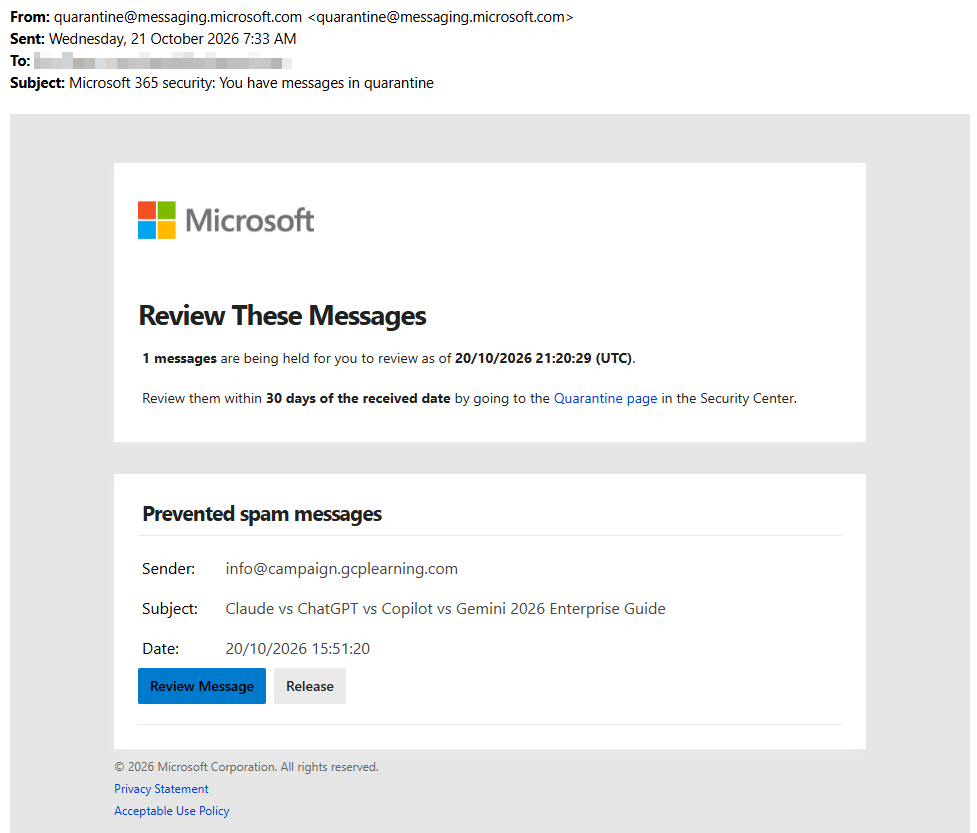
Microsoft 365 automatically holds back emails that look like spam, phishing or something harmful, so they never reach your inbox. When it does, Microsoft sends you an email titled "Microsoft 365 security: You have messages in quarantine" listing what it held back.
This is a genuine email and a sign the protection is working. Scammers sometimes copy it though, so check:
- It comes from quarantine@messaging.microsoft.com
- It doesn't ask for your password, payment or personal details (the real one never does)
What you can do from the email
- Find the message in the list and click Review to see who sent it and what it contains.
- If you were expecting it and you're confident it's genuine, click Release to send it to your inbox. Some messages show Request release instead, which asks IT to check it first.
- If it looks like a scam, click Report, or just leave it. Quarantined messages are deleted automatically.
Tip: Not sure? Don't release it. Email helpdesk@ozharvest.org and we'll check it for you.
Related
Need help?
Email helpdesk@ozharvest.org or submit a ticket.